
Use this tag to post a userscript that operates on Stack Exchange sites and/or uses the Stack Exchange API. For questions about user scripting and Stack Exchange, or its API, use the [scripts] tag instead. Scripts are usually JavaScript and usually browser extensions/userscripts. For other tools, the [app] tag may be more appropriate.
Use this tag to post a userscript that operates on Stack Exchange sites and/or uses the Stack Exchange API.
For questions about user scripting and Stack Exchange, or its API, use the scripts tag instead. See this moderator's post for the history of this distinction.
Scripts are usually JavaScript and usually as browser extensions/userscripts. For other tools, the app tag may be more appropriate.
Userscripts are predominantly privileged JavaScript that runs in a web browser and modifies a web site's behavior and/or appearance. See the userscripts wiki on Stack Overflow.
How to install user scripts in Google Chrome
There are two methods for installing userscripts in Chrome:
Method 1 (preferred, easiest, quickest)
- Install a userscript manager extension from the Chrome Web Store (free and quick). Choose one of:
- Visiting any page with a .user.js extension will now make the userscript manager prompt you to install the userscript:
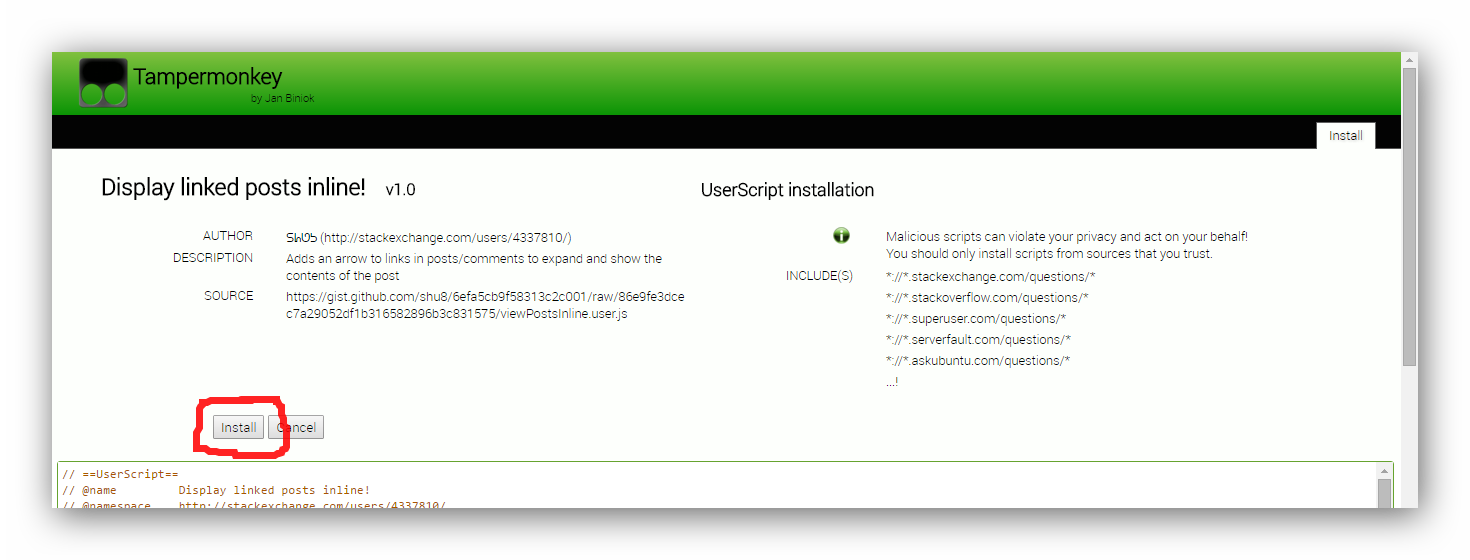
Note: You may see certain posts linking to userscripts in 2 ways: 'view source' (or similar) or 'install'. Clicking 'view source' will let you do just that, and clicking 'install' will cause the userscript manager to detect it and let you install it from a simple, user-friendly screen (shown in the above screenshot).
Method 2 (unusable in Chrome versions > 35)
Click on the link to the
.user.jsfile found in the postLook for the confirmation at the bottom of your browser and click
Continue.
Chrome will warn you that you can't install the script.

Because Google has disabled the direct installation of extensions that are not downloaded from their Web Store, you'll have to perform a few extra steps before you can use the script.The script should have appeared in your downloads bar.
If the file name is modified to
<filename>.user (<number>).js, rename the file so it ends with.user.js. Note: If file extensions are not displayed on your system, the name has to end with.user.Open the extensions manager.

Drag drop the file from the downloads bar to the extensions page. If you had renamed it, drag-drop it from your file manager.
Release the mouse if the text "Drop to install" appears.
A dialog appears. Click
Addto finish the installation.
The script should now be installed. Refresh all tabs affected by the script to start using it.
How to install user scripts in Firefox
Install a userscript manager add-on for Firefox if you haven't done so already. Choose one of:
- Tampermonkey
- Violentmonkey
- Greasemonkey - no longer recommended as it has some backwards compatibility issues with older userscripts
Click on the link to the
.user.jsfile found in the post.An installation dialog from the userscript manager will appear. Review the sites on which this script will work on, view the source of the script if so desired and confirm that you wish to install the script

The script should now be installed. Refresh all tabs affected by the script to start using it.
How to install user scripts in Safari
GreaseKit (The hack approach, for Safari 4 and earlier)
- Download and Install SIMBL – (From the SIMBL website), SIMBL, pronounced like “symbol” or “cymbal” enables hacks. In other words, you can “patch” Mac applications to add functionality to them.
- Next, download GreaseKit. To install it, drag the
GreaseKit.bundlefile to~/Library/Application Support/SIMBL/Plugins. If you don’t have aSIMBL/Plugins/folder, just create it, then dropGreaseKit.bundleinto it. - Restart Safari, and you will see a new entry in the menu bar for “GreaseKit”.
- Click on the link to the
.user.jsfile found in the post to install the userscript. - The script should now be installed. Refresh all tabs affected by the script to start using it.
from http://mosheberman.com/wordpress/?p=284
NinjaKit (a Safari 5 extension)
- Go to the NinjaKit homepage. The page is in Japanese, but don't worry—the install link is in English.
- Click on the "NinjaKit for Safari" link.
- If you are prompted to open or save the file, select open. If the file automatically downloads, find the downloaded file (
NinjaKit.safariextz) and double-click it. - When Safari pops up a message confirming you want to install NinkaKit, click install.
How to install user scripts in Opera 15 and newer versions
Install the TamperMonkey extension, which makes installation simple and easy.
How to install user scripts in Opera 12 and older versions
- Create a folder for userscripts. (eg,
C:\Program Files\Opera Browser\Userscripts\- it does not need to be within the Program Files folder, anywhere is fine.) - Within Opera, go to
Tools>Preferences. - Click the
Advancedtab. - Click
Contentin the choices on the left. - Click
JavaScript options. - For the "User JavaScript files", click
Choose. - Select the userscripts folder created in step 1. and click
OK. - Click on the link to the
.user.jsfile and save it to the userscripts folder created in step 1. - Refresh the tab(s) affected by the script to start using it.
from http://www.howtogeek.com/howto/3986/set-up-user-scripts-in-opera-browser/
Development resources
- Greasy Fork - a site to host Greasemonkey scripts.
- How to use jQuery in your scripts


