Tell me more ×
Stack Apps is a question and answer site for apps, scripts, and development with the Stack Exchange API. It's 100% free, no registration required.

No more re-typing the same comments over and over!

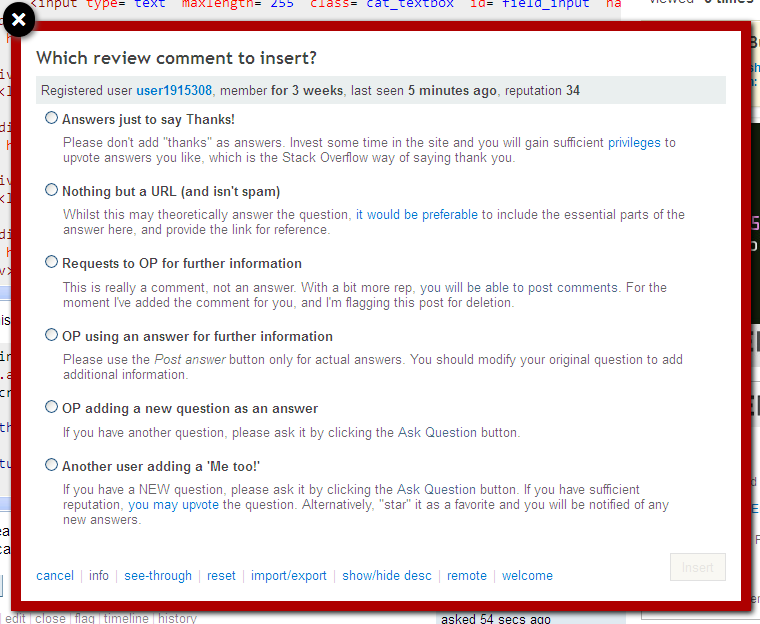
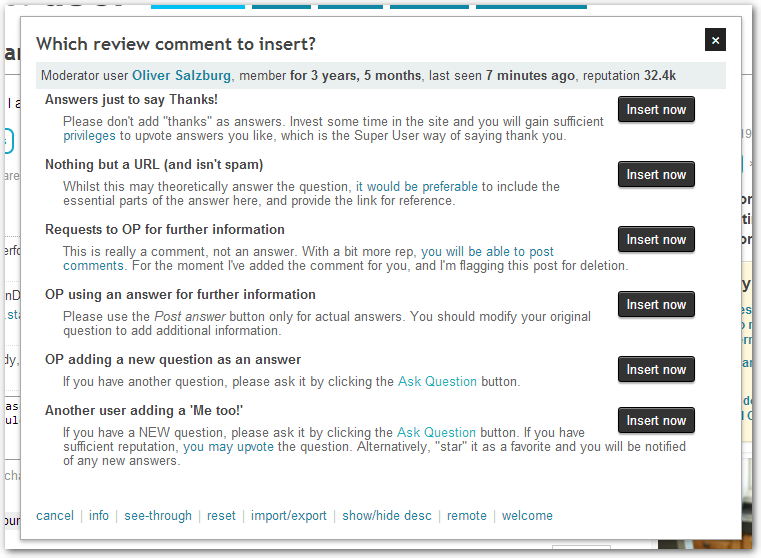
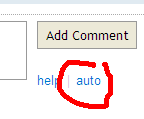
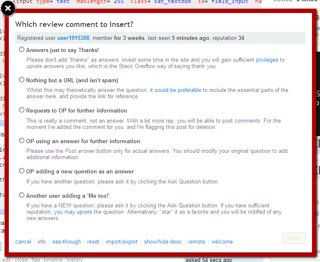
This script adds a little 'auto' link next to all comments boxes. When you click the link, you see a popup with 6 configurable auto-comments, which you can easily click to insert.

This script was inspired by answers to this question on meta.
Thumbnail

Features

1. Read your comment before you post it!

Note that the dialog only inserts the text, it doesn't send the comment, nor does it flag anything; this is so that you can check the text before posting!

2. Customize the texts

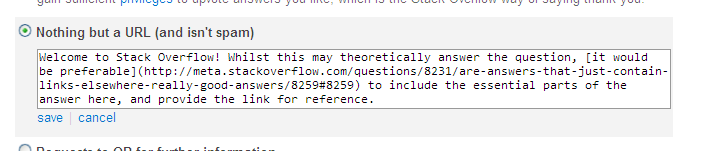
Simply double click on a comment text or description in order to customize it. Hit the 'reset' button if you screw up. This customization is currently per-site. Note that the "Welcome to $SITENAME$" text is automagically inserted if the user is 'new' (member for less than a week), so you don't need to add that to your custom text (but you can if you want to, see '9' below).

If you need more/less than the default 6 comments, just carry on reading...

3. Quick user info

The dialog also includes a mini-summary of the user's activity (because if they haven't been back in months, there's no point writing them a comment).

4. Automatic notification of new versions

The script will also notify you if a newer version is created.

5. Import/export of custom comments

This helps with transferring custom comments between sites. The export/import 'format' is also conveniently presented as markdown, so you can post it in an answer below, and let others benefit from your words of wisdom.

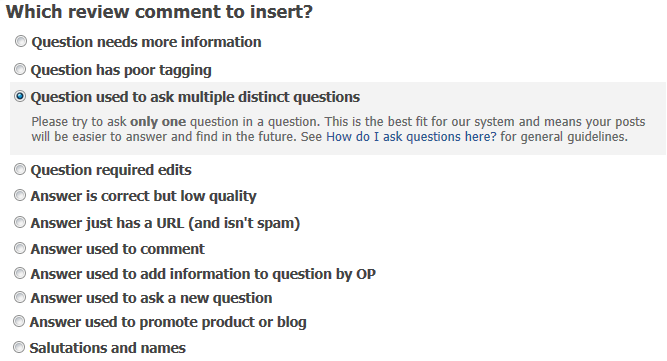
Note that you can also use the Import to create an arbitrary number of comments (the default is 6). If there are too many, you can use the show/hide desc link to gain a bit of space.

6. Remote source for comments

If you get bored with copy/pasting your comments between sites and/or computers, you can use the 'remote' button to define a remote source for your comment texts. See here for more details.

7. Differentiated comments for questions/answers

If you prefix your comment title with [Q], it will be only displayed for questions ([A] for answers). Non-prefixed comments are displayed for both.

8. [type here], [username] & [OP]

If the text [type here] is included in a comment, it will be automatically selected for completion when inserted. [username] will be replaced with the user's name (or just 'user' if nothing was found), and [OP] with the original poster's name (if found, else 'OP').

9. Customise welcome message

The default message is "Welcome to $SITENAME$" - which is shown for any 1-week-old users. By clicking on the 'welcome' link at the bottom of the popup, you can opt to change this message, or leave it empty to show no messages at all. You can also 'force' the message for older users on a one-off basis. This is per-site. Screenshot
Installation

Click HERE to install the user script. (warning Google are making things difficult for non-store user scripts. A workaround is explained here. For other browser-specific instructions, read the instructions here)

Click HERE to preview the code.

For more information about user scripts, check out the tag wiki here.

Update info

(See comments and answers below for details)

V1.2.8 - Update to take advantage of new 'draggable dialogue' functionality.

V1.2.7 - Correct bug noted by Oddthinking, and implement the 'force welcome' function requested by Martin Scharrer.

V1.2.6 - Implement the much-requested override for the new user Welcome message. Correct a bug with mangled markdown and another due to modified SE markup.

V1.2.5 - Implement [OP] tag as suggested by Gaffi. 'Fix' for markdown/html conversion bug reported by Madara Uchiha.

V1.2.4 - Modify code to get script working in new Review (reported by Oliver Salzburg), hat-tip to Shog9 for the fix.

V1.2.3 - Slight modification to remote dialogue (details here). You can now use [username] as a wildcard (as suggested by daviesgeek). Corrected & bug noted by Oliver Salzburg

V1.2.2 - Remote comment sources. Broadcasts. Read the details here.

V1.2.1 - update to work with 10k tools (suggested/implemented by ThiefMaster)

V1.2.0 - one fix (remove greeting before switching to edit mode), and one feature: hit Enter key to submit (suggested by Bruno Pereira). Note that this isn't a major change, it's just my version comparison is string-wise, so V1.1.10 won't work.

V1.1.9 - fixed nasty javascript regex backreference replace bug (reported by ThiefMaster). For explanations see here and here.

V1.1.8 - fixed 'jQuery 1.7.1' bug, which stopped insert button being enabled. (No idea why it stopped working - though judging from this, maybe it should never have worked, as I was using attr("disabled", ""))

V1.1.7 - create pseudo categories for differentiating between comments for questions and comments for answers (suggested by oers) - simply prefix the comment title with [Q] or [A]

V1.1.6 - make script work in /admin/dashboard (for moderators, requested/implemented by Sathya)

V1.1.5 - make script work in /review (requested by Gilles (now uses jquery delegate for attaching events)

V1.1.4 - if the text [type here] is included in a comment, it will be automatically selected for completion (requested by daviesgeek)

V1.1.3 - include Registered/Unregistered in user info (requested by waiwai933).

V1.1.2 - Fixed bug when using 'magic' links (reported by Alex)

V1.1.1 - If you have descriptions auto-hidden, the selected one will still be shown (suggested by Alex).

V1.1.0 - bug fix. (SE's full.js is now delayed at load, so the unbind('click') was undoing my click() - fix from @balpha).

V1.0.9 -
- a) removed upgrading bits from previous version
- b) added internal notification feature
- c) now uses internal notification for announcing new versions - d) corrected the 'new versions announced once only' (it never worked AFAICT)
- e) corrected the $SITEURL$ escaping 'quirk'
- f) stopped using .owner class for userinfo - g) corrected bug which showed greeting twice.

V1.0.8 -
- a) Mend see-through code.
- b) Make storage more neighbour-friendly (add prefix, backwards compatible).
- c) Allow variable number of custom comments (can only be modified via import).
- d) Add show/hide description functionality. Add vertical scrollbars if too many comments.
- e) Use 'selfupdatingscript' for update checks
- f) Revert $SITEURL$ to not contain the http://.

V1.0.7 - add an import/export function - can be used to transport custom comments between sites (note the use of $SITEURL$ and $SITENAME$ tags),

V1.0.6 - changes to the list of included urls

V1.0.5 - suppress warnings on new updates if already installed (previously each site would tell you about a new update, even if you'd already installed it)

V1.0.4 - corrected two bugs in code detecting the appropriate userid to lookup

V1.0.3 - corrected a bug in rep formatting. Integrated a function to poll once a day for new versions and notify user if any found.

V1.0.2 - implemented customisation, using HTML5 storage to allow users to create/modify their own messages

V1.0.1 - some refactoring, corrected a bug in the regex that converted html to markup.

Note

Any comments welcome, whether on the functionality or the code.

Can be used in tandem with my other user script.
Credits

  • TomWij (below) created a modified version of the script, which inspired my V1.0.8
  • balpha came up with the clever (evil) way to make the script 'self-updating'
  • All the people who made suggestions in the comments and answers below!

Known issues/Future plans

  • Currently thinking about how to make the Welcome message configurable (i.e, how to present the configuration in the interface without creating extra clutter)
  • The main future plan is to get this script adopted by SE. I like maintaining it, but some of the usability niggles (sharing across sites is still clunky, even with the remote option) can only be resolved centrally. (Vote here if you agree!)
  • The new 'service announcement' functionality has a major 'bug' - you have to dismiss it manually on every single site. Sorry!
share|improve this question
5  
I suggest you move your code into a well-organized GitHub repo. Then you can take advantage of the built-in Wiki and Issue manager to handle documentation and feature request/bugs. I've seen the gist, and it's very large, do you think you should separate your code into several files that work together? See the CV-pls Extension – Madara Uchiha Jan 12 at 11:01
show 6 more comments

43 Answers

1 2

Feature Request

Be able to take cursor out of picture area while drawing, then bring the cursor back into the box and continue to draw

Bug Report

If you move the cursor very quickly out of the picture, there is a space between the edge of the border and the edge of the picture. The gap size increases as the speed out of the box increases

share|improve this answer
show 1 more comment

Bug Report

I am unsure of why, but for some reason, the "Auto" link does appear like it should all of the time. I am using Firefox 20 on Windows. I have edited the code slightly to be more grammatically correct, but I don't believe I have changed anything that would cause the script to not work. I put my code on Github Gist for you to look over in case I have changed anything detrimentally

share|improve this answer

Google Chrome is now making it harder to install the script for security reasons.

Upon clicking on the install link, a warning pops up refusing to install it. There's a Learn more link, recommending you use Google's oh-so-convenient distribution mechanism.

(There is a workaround for the user hidden in the text, which I am about to try.)

share|improve this answer
show 3 more comments

I have the problem that whenever I change or add any comments, my changes are gone after restarting my Firefox and all comments are back to the default values.

Has anybody a hint what this could be caused by? I use FF19 on Ubuntu and Autocomments 1.2.8. I also wonder if the noscript addon of FF could have any influence but for the SX sites all scripts are allowed.

Any hints or ideas?

share|improve this answer
show 1 more comment

I am excitedly using the "much-requested override for the new user Welcome message." in V1.2.6, as one of those requesters.

The save function doesn't appear to be sticking. It works immediately, but when I come back later, it has returned to the default message.

(Chrome, Windows)

share|improve this answer
1  
Oddthinking, thanks for letting me know. Fixed (or should be!) in 1.2.7 – Benjol Jan 22 at 6:03

At the moment the Welcome message for new users is not displayed if the question was migrated from a different SE site and the user does has an account on the target site yet. The message should be inserted in this case.

share|improve this answer
show 2 more comments

There should be a method to force the insertion of the Welcome message. This can be required because some new users might have and account for 2-3 weeks already but just now started to post questions or answers. They might have found SE, registered an account but then didn't return for a while. Often these people still are new to the site and a Welcome message is appropriate, especially if it got changed to include a link to a special Welcome meta page (which I did for my site TeX.SE).

share|improve this answer
show 3 more comments

Can $SITENAME$ be changed for Christianity? Here's what a comment to a new user reads:

Welcome to Christianity! ...

Which sounds pretty creepy. For one thing, most folks who stumble into the site are already affiliated with some faith, which might or might not be Christianity. For another, it sounds like we are a cult or a church. We aren't.

Could $SITENAME$ be changed to "Christianity—Stack Exchange" or "Christianity.SE"?

(I haven't tried to adjust the messages myself, but besides being a bit tedious, it probably would be best to not have new users of the script sending the wrong signals.)

It's less of a concern, but I think it would be odd to see messages like:

Welcome to English! ...

or

Welcome to Parenting! ...


I forked a version and made the following changes at line 67:

if(sitename == "Stack Exchange"){
  sitename = arr[arr.length - 2]; //workaround for SE sites..
  greeting = 'Welcome to ' + sitename + '—Stack Exchange! ';
  sitename = sitename + '.SE';
}

That way, the "Answers just to say Thanks!" comment reads:

Welcome to Christianity—Stack Exchange! Please don't add "thanks" as answers. Invest some time in the site and you will gain sufficient privileges to upvote answers you like, which is the Christianity.SE way of saying thank you.

The same comment on SO reads:

Welcome to Stack Overflow! Please don't add "thanks" as answers. Invest some time in the site and you will gain sufficient privileges to upvote answers you like, which is the Stack Overflow way of saying thank you.

share|improve this answer
1  
Typically lazy developer's response, how about *%SITENAME%*? – Benjol Mar 7 '12 at 7:13
1  
the way I'm thinking about it right now, I think I'd be tempted to make the whole greeting configurable (there are some people who don't like it). I've got a few other changes in the pipes, so this may take a while. In the meantime, if you want to do a personal hack while you're waiting, you need to track down the user-script file, go to line 66, and replace sitename = arr[arr.length - 2]; with sitename = arr[arr.length - 2] + 'your_suffix_here';. After saving, you'll need to F5 in your browser to see the difference... – Benjol Mar 9 '12 at 6:44
1  
Looks good to me, watch out, I've got a new version coming up, you'll need to rebase your fork :) – Benjol Mar 23 '12 at 14:56
show 9 more comments

(You can now override this if you don't like it)

Another bug: Every comment is prefixed with "Welcome to StackOverflow!" since recently. Doesn't seem to happen on all pages; http://stackoverflow.com/questions/9729546/jquery-script-being-executed-before-all-each-has-completed is one where it does happen though.

share|improve this answer
show 4 more comments

(something equivalent, anyway)

I see a couple of comments here suggesting that Benjol is thinking of making the Welcome message configurable.

This is a formal request for that feature.

On Skeptics.SE, we have a meta-post which is a Welcome to New Users FAQ, and explains some of the ways Skeptics.SE differs from other Stack Exchanges. I have experimentally forked this code, just to make the Welcome message include a link to this meta-post.

Unfortunately, my JavaScript skills are too dodgy to make it customisable and offer it back to you as a patch. (The customisation strikes me as particularly tricky for the troublesome few that moderate multiple Stack Exchanges.)


Suggested presentation:

This is only a suggestion - incorporate it into the existing options file. It is a bit ugly, but I think better than having a whole separate config system.

~~~ This is comment text. This line represents the default.
Welcome, my dearest new friend, to $SITENAME.

~~~[skeptics] Using the same 'restriction' notations as [Q] and [A], this overrides the default for one site.
[Welcome to Skeptics](http://meta.skeptics.stackexchange.com/questions/1505/welcome-to-new-users)!

An alternative would be to put it all on one line, but then the [qualifier] notation would conflict with the [link]() notation.

share|improve this answer
show 5 more comments

The following message breaks stuff (results in HTML being inserted) etc.:

[**Please, don't use `mysql_*` functions in new code**](http://bit.ly/phpmsql). They are no longer maintained [and are officially deprecated](https://wiki.php.net/rfc/mysql_deprecation). See the [**red box**](http://j.mp/Te9zIL)? Learn about [*prepared statements*](http://j.mp/T9hLWi) instead, and use [PDO](http://php.net/pdo) or [MySQLi](http://php.net/mysqli) - [this article](http://j.mp/QEx8IB) will help you decide which. If you choose PDO, [here is a good tutorial](http://j.mp/PoWehJ).
share|improve this answer

Here's a bug report.

I've attempted to add the following comment:

[**Please, don't use `mysql_*` functions in new code**](http://bit.ly/phpmsql). They are no longer maintained and the [deprecation process](http://j.mp/Rj2iVR) has begun on it. See the [**red box**](http://j.mp/Te9zIL)? Learn about [*prepared statements*](http://j.mp/T9hLWi) instead, and use [PDO](http://php.net/pdo) or [MySQLi](http://php.net/mysqli) - [this article](http://j.mp/QEx8IB) will help you decide which. If you choose PDO, [here is a good tutorial](http://j.mp/PoWehJ).

Which should render like so:

Please, don't use mysql_* functions in new code. They are no longer maintained and the deprecation process has begun on it. See the red box? Learn about prepared statements instead, and use PDO or MySQLi - this article will help you decide which. If you choose PDO, here is a good tutorial.

Instead, right after saving, it renders to

[**Please, don't use `mysql_*` functions in new code***](http://bit.ly/phpmsql)*. They are no longer maintained and the [deprecation process](http://j.mp/Rj2iVR) has begun on it. See the [**red box**](http://j.mp/Te9zIL)? Learn about [</a>*<a href="http://j.mp/T9hLWi">prepared statements*](http://j.mp/T9hLWi) instead, and use [PDO](http://php.net/pdo) or [MySQLi](http://php.net/mysqli) - [this article](http://j.mp/QEx8IB) will help you decide which. If you choose PDO, [here is a good tutorial](http://j.mp/PoWehJ).

Which renders as

Please, don't use mysql_* functions in new code*. They are no longer maintained and the deprecation process has begun on it. See the red box? Learn about prepared statements* instead, and use PDO or MySQLi - this article will help you decide which. If you choose PDO, here is a good tutorial.

I suspect the asterisks are derailing it, but why should it care about it anyway? Does it attempt to also fix the comment before saving?


Edit

Seems like the Comment's markdown is parsed into HTML and then remapped to Markdown (why?!). Using's Chrome's console and editing the localStorage directly with

<a href="http://bit.ly/phpmsql"><strong>Please, don't use <code>mysql_*</code> functions in new code</strong></a>. They are no longer maintained and the <a href="http://j.mp/Rj2iVR">deprecation process</a> has begun on it. See the <a href="http://j.mp/Te9zIL"><strong>red box</strong></a>? Learn about <a href="http://j.mp/T9hLWi"><em>prepared statements</em></a> instead, and use <a href="http://php.net/pdo">PDO</a> or <a href="http://php.net/mysqli">MySQLi</a> - <a href="http://j.mp/QEx8IB">this article</a> will help you decide which. If you choose PDO, <a href="http://j.mp/PoWehJ">here is a good tutorial</a>.

Appears to fix the problem.

share|improve this answer
1  
to be honest, I can't remember when or why I decided to store it as HTML. Whatever, I've got a pseudo-correction in the works (very pseudo, it skips transformations of * and ** if it finds a backtick in the middle). – Benjol Oct 25 '12 at 8:54
show 8 more comments

(sort-of, you can now customise the welcome message)

Bug observed with 1.2.4 and 1.2.5:

On some sites, instead of having the automatically-extracted site name in the comments, I get the question title. For example:

Welcome to Is Category Theory useful for learning functional programming?! Please don't add "thanks" as answers. Invest some time in the site and you will gain sufficient privileges to upvote answers you like, which is the Is Category Theory useful for learning functional programming? way of saying thank you.

This happens on Computer Science and Travel but not on Stack Overflow or Security or Stack Apps, so my guess is that whatever you're scraping there is a bit different on beta sites.


By the way, I would prefer to see Stack Exchange there (without the site name), at least on the sites which don't have a distinct branding (i.e. perhaps excepting SO, SU, SF and AU). Sentences like “Welcome to Computer Science!”, “the Travel way of saying thank you”, … don't make much sense.

share|improve this answer
show 3 more comments

Bug report:

Prefixing entries with [A] no longer shows these entries when adding a comment to an accepted answer. Only entries without a [A] or [Q] prefix are shown on such posts currently.

For my canned-messages set, where each entry is has either a [A] or [Q] marker, that means nothing is shown at all for accepted answers.

share|improve this answer
show 2 more comments

Can you add support for an Enter or Return keystroke to allow for insertion of the currently selected option? This would be really helpful! I have several custom comments and it can be a pain to scroll down to find the insert button.

share|improve this answer
show 9 more comments

Request: I see a lot of newbies post a comment saying "Thanks this worked perfect for me. It's exactly what I need" on an answer to their question, yet they do not mark the answer as accepted. [username] plugs in the username of the answerer when posting on an answer, but it would be helpful to also include an [OPusername] (or something to that effect) to be able to @ the original question asker on a specific answer.

i.e.

"If this answer is helpful to you, [OPusername], then please consider marking it as the accepted answer so others may more easily find it in the future. This is also a polite way to thank the person answering your question for helping you out."

share|improve this answer
1  
Implemented, but using [OP] instead of [OPusername] – Benjol Nov 1 '12 at 6:38

There are two 'major' changes to V1.2.2

'Remote' comment source

You can now define an external source for your comments, and 'import' them. This means that you don't have to manually copy comments from site to site and PC to PC.

To do this, you click on the 'remote' link; enter the url for your data source; then click on 'get now'.

The data source must be formatted as jsonp. There is a new 'jsonp' link in the import/export dialog which will create the appropriate jsonp from your existing comments.

It is also possible to automatically invoke it every time you open the dialog, by selecting the auto-get checkbox. I'm interested in feedback on this.

'Broadcasts'

I've added a function to be able to 'broadcast' messages without changing the code. The intended use for this will be to ask for feedback on proposed future changes. Taken this off-line again, it was not completely thought-through and you had to dismiss on every site... (sigh, no global storage)

share|improve this answer
1  
@jrg, actually, don't. There seem to be problems with parallel ajax queries here. While trying the next version I found the comments sometimes just disappear and never come back. – Benjol May 23 '12 at 12:21
show 5 more comments

@Benjol You could add the extra set of comments that I use in-tandem with Phrase Express:


@<username> Please don’t use signatures or taglines in your posts. Every post you make is already "signed" with your standard user card, which links directly back to your user page


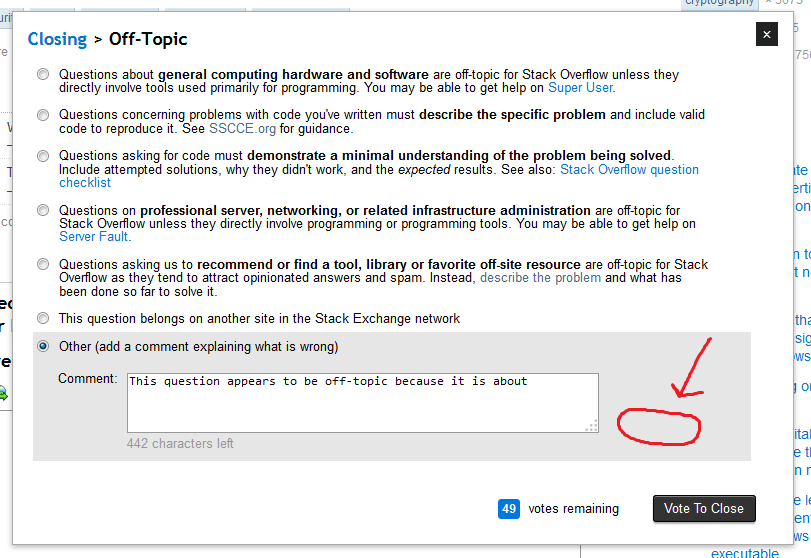
Shopping questions are off-topic as per the FAQ: it is not about a shopping or buying recommendation


share|improve this answer
show 3 more comments

Can you add multiple pages of comments? Currently if you have a lot of auto comments, you have to scroll to see them, but it would be nice to be able to click next and previous to see lists of about 5 comments.

Also, the "see through" feature is cool, but it should be activated by a click, instead of on mouse over.

One more problem: Importing the comments seems not to save them.

share|improve this answer
show 6 more comments

It would be great to be able to use this same functionality in the edit summary when making edits. Most of the edits I do fall into a small subset of "categories" and it pains me to have to put in the same summary over and over.

Adding a category (much like already exists for question-only or answer-only comments) would be a big help beyond just adding the "auto" link next to the edit summary input box.

To take it one step more, since edits may be for more than one thing at a time, a slightly different interface that is checkbox-based, rather than radio buttons would be ideal so that I could combine / chain the edits I've made.

In summary, here's what I am asking for (in order of priority / usefulness):

  1. Adding the dialog link to the Edit Summary input
  2. Adding a category for Edit Summaries
  3. Changing the behavior for edit summaries to allow for adding multiple "comments"
share|improve this answer
show 2 more comments

Could you add classifications/grouping for comments?

I'd like to group my comments into

  1. comments for question
  2. comments for answers
  3. Both

And only the relevant comments will show, when I click the auto-link.

share|improve this answer
show 6 more comments

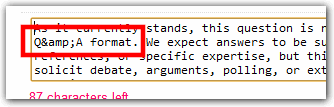
Bug: if my comment contains &, when I insert it it will insert &amp; instead.

Preview

enter image description here

Result

enter image description here

Import/Export

enter image description here

share|improve this answer
show 5 more comments

Can you please add a feature that allows you to type [username] (or something of the like) and the script inserts the user's name? I don't know how hard that would be, but I know you are already grabbing the user name. If at all possible, I would really appreciate this! Thanks so much for all your hard work on this script.

share|improve this answer
show 3 more comments

It might be really nice if this could come pre-loaded with a in a few comments by default that will be global to all sites. There are already a couple good examples here.

Another useful one would be something about the accept rate.

Your accept rate is currently low, please review your existing questions. Please respond to any comments, please update to add more detail if possible, If there is correct answer, please accept, if any of the existing answers don't work please add a comment explaining why.

share|improve this answer
1  
You did see that you can modify the comments yourself? If you really want to change them across all sites, you can hack the script (currently: in future I'm looking at being able to use 'global storage'). I think the current default comments are relatively applicable to all sites, and as the original intent was to help with reviewing, I didn't think of things like accept rate. – Benjol May 12 '11 at 4:40

Another future idea: expandable groups of comments similar to the way Close>Off-Topic opens a list of sites.

share|improve this answer
1  
Implementation thoughts: See my answer for a local storage based extension. Use a new syntax (eg. ##) that when read is stored as a comment with description "header", then when reading such comment you could embed all subsequent non-header comments and easily have expandable groups. – Tom Wijsman Mar 4 '11 at 18:19
show 2 more comments

I'll drop my setup here.

###Comment as answer
__This is not a forum. Please only use the 'Post Your Answer' button if you can answer the asker's question; <a href="http://gaming.stackexchange.com/privileges/comment">post a comment</a> otherwise.__ We require some <a href="http://gaming.stackexchange.com/faq#reputation">reputation</a> before you can comment others' posts to prevent abuse; why don't you try and get some by <a href="http://gaming.stackexchange.com/unanswered">answering a question?</a>

###Question as answer
__This is not a forum. If you have a different question from the asker's, please use the <a href="http://gaming.stackexchange.com/questions/ask">Ask Question</a> button__ instead. You don't even have to login!

###Upvote as Answer
__This is not a forum. If you wish to thank somebody, you should <a href="http://gaming.stackexchange.com/privileges/vote-up">vote him up</a>.__ We require a little bit of <a href="http://gaming.stackexchange.com/faq#reputation">reputation</a> before you can do that to prevent abuse; why don't you get some by <a href="http://gaming.stackexchange.com/unanswered">answering a question?</a>

###Not a Real Question
This is not a forum; __this is a questions and answer site, and I'm afraid your post isn't really a question, because <a href="http://blog.stackoverflow.com/2011/01/real-questions-have-answers/">real questions have answers, not items or ideas or opinions</a>.__ <a href="http://gaming.stackexchange.com/faq">Please read the FAQ for more information.</a>
share|improve this answer
1  
watch out, because the "Welcome to SiteName" is automagically added if the user is 'younger' than a week. – Benjol Mar 2 '11 at 16:54
1  
Posting setups is a good idea though – Benjol Mar 2 '11 at 17:02
2  
I've added an import/export function which will make pasting setups like this easier, and also allow you to copy between sites (and/or browsers). I'm starting to like your list more than my own :) – Benjol Mar 4 '11 at 10:29
show 8 more comments

Is it possible that you could save the comments in a file so that when the script is updated I don't lose my custom comments?

share|improve this answer
1  
You shouldn't lose your comments when the script is updated - has that happened? But, to answer your question: hit the import/export button and copy/paste the text to 'somewhere safe'... – Benjol Dec 8 '11 at 14:48
1  
Note that you can now save your comments to a file, read here. – Benjol Apr 11 '12 at 12:14
show 3 more comments

The following message breaks the script, apparently due to the $ in backticks:

###jQuery-$
Did you know that you only have to write `jQuery` in its long form once? By wrapping your code in `(function($) { .... })(jQuery);`, you can use `$` no matter if `noConflict` has been used or not.
share|improve this answer
show 2 more comments

In GreaseMonkey the Name of the Script is AutoReviewComments but the name of the StackApp is Pro-Forma comments.

This makes it very hard to find the app (once you forgot its name :D).

Maybe those could be named equally?

share|improve this answer
show 1 more comment
1 2

You must log in to answer this question.

Not the answer you're looking for? Browse other questions tagged